

Dropbox Fax Referral Code & Link
Get 5 free outbound fax pages onceUse https://app.fax.dropbox.com?ref=1c4ad3da for Dropbox Fax signup and 5 standard free outbound pages once; no monthly renewal.
Monica’s referral

Monica
Community referrals
No community referral links yet. Share yours!
What does this Dropbox Fax referral code offer?
The Dropbox Fax referral code link contains the identifier 1c4ad3da: https://app.fax.dropbox.com?ref=1c4ad3da&s=F&utm_medium=social&utm_source=facebooktwitter&utm_campaign=hellofax-incentivized-post&utm_content=hf. New accounts receive 5 free outbound fax pages once under Dropbox Fax's standard offer. An additional invitation-specific allowance has not been independently confirmed, so do not assume this link supplies ten pages in total. The standard pages do not renew monthly, and some international destinations consume more than one page credit per document page. Details were checked on November 13, 2026.
Dropbox's official free-plan explanation confirms the five-page starting allowance. Dropbox Fax is the current name of HelloFax, so older addresses and campaign labels can still contain “HelloFax.” The standard free allowance is useful for trying outbound online faxing before deciding whether you need a paid service.
How do you open the invitation and send a fax?
Open the Dropbox Fax referral code link before creating your account, then follow the official signup instructions. The value 1c4ad3da is embedded in the URL; it is not a verified coupon that you need to type into a checkout field. If the link opens a login screen, use the account-creation option available there and review the offer displayed for your account.
Prepare the fax before submitting it:
- Confirm the recipient's fax number directly with the intended recipient, including its country code.
- Create your account and check the available outbound page balance.
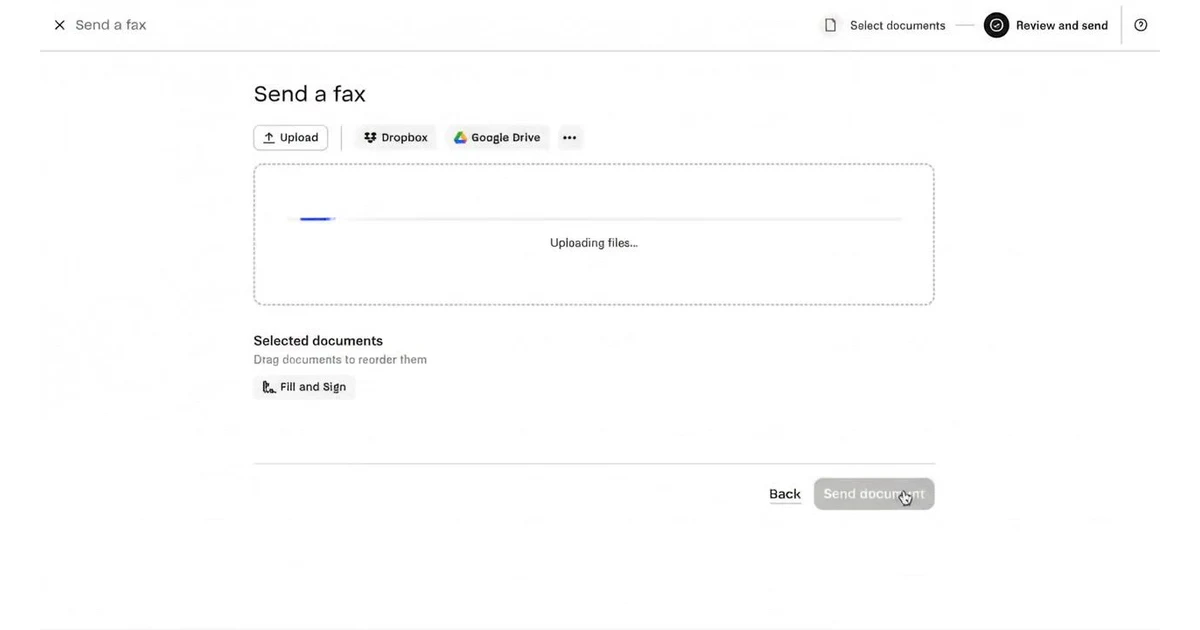
- Upload the document and inspect its page order, orientation, and readability.
- Enter the destination number and review any cover page or message you add.
- Check the displayed page usage or price, send when ready, and review the delivery result.
This is a suggested preparation sequence, not a report of a test transmission. A successful signup alone does not establish that a particular fax has reached its recipient. For a time-sensitive document, allow time to check delivery and address a failed transmission.
Dropbox Fax's terms require account holders to be at least 18 and legally able to enter the agreement. Confirm availability for your location before signing up; supported fax destinations do not establish customer eligibility everywhere.
Are the five free pages a monthly allowance?
No. Dropbox's free-pages help article says the initial five pages are a one-time allocation. They are not five new pages every month. That distinction matters if you expect to fax repeatedly: a small starting balance and a recurring subscription solve different needs.
Check your account balance before each transmission, especially when sending several documents or sending abroad. Keep a simple record of the documents you intend to send and the credits each destination requires. For an occasional short fax, the standard starting allowance may be enough; a longer document may require a purchase. Confirm the actual amount in the sending screen rather than treating the number of files as the number of pages.
Which documents can you upload?
Dropbox Fax supports common formats including PDF, Word documents, spreadsheets, presentations, and images. Its official file requirements list a maximum of 40 MB per document and an end-user transmission limit of 250 pages. Those technical upload limits are separate from your available free-page balance.
A useful preparation method is to export your final document as a PDF and inspect every page before uploading. Look for blank pages, clipped margins, tiny text, or image scans that are difficult to read. Compare the uploaded preview with your original file, particularly if the source document uses unusual fonts or complex tables. This reduces avoidable surprises without guaranteeing how the receiving fax machine will print it.
Only include pages the recipient needs, and check that the document belongs with that recipient before sending. An invitation does not change the service's document limits or the requirements of the organization receiving your fax.
How many credits does an international fax use?
The number depends on the destination. Dropbox's long-distance faxing guide explains that international destinations can use several page credits for each document page. A two-page document therefore does not always cost two credits.
Consult the official international pricing table for the recipient's country before sending. Multiply the final document's page count by the applicable destination factor, then compare that result with the balance shown in your account. Use the current sending screen to resolve any difference. The guide also explains international number entry using a plus sign and country code; verify the complete number rather than copying a local dialing prefix blindly.
Destination coverage and the availability of a local inbound fax number are separate questions. If you need a particular country or number type, confirm those details before selecting a plan.
Do you need a paid plan to receive faxes?
Yes. The official Dropbox Fax website explains that receiving faxes requires a paid account with a fax number. The standard five outbound pages should not be treated as a free incoming fax line.
For sending beyond the starting allowance, Dropbox also describes pay-as-you-go service without a subscription. Compare the displayed cost for your complete fax and any international page calculation before buying. If you choose a subscription for ongoing sending and receiving, check the billing interval, included pages, and renewal conditions shown at checkout. Select the option that matches how often you expect to send documents.
Frequently asked questions
Is 1c4ad3da a manual discount code?
The Dropbox Fax referral code identifier 1c4ad3da appears in the invitation URL's ref parameter. A separate manual coupon or checkout discount has not been confirmed for it.
Does the invitation guarantee ten free pages?
No. The confirmed starting benefit is five standard outbound pages once. The Dropbox Fax referral code link does not establish an additional five-page award on top of that allowance.
Is this the same product as HelloFax?
Yes. Dropbox Fax was formerly called HelloFax. This Dropbox Fax referral code listing uses the current product name while retaining the original invitation URL supplied for the service.
What should I check if no additional pages appear?
Check the standard balance and any offer shown inside your account. Do not purchase on the assumption of an unconfirmed bonus. Contact official support if the Dropbox Fax referral code link displays an offer that does not match your account, and keep the relevant offer details for reference.
Information
Categories
More Referral Codes
Get $25 in Ting Mobile service credit
Get $22 credit when you start a trial

No extra signup bonus verified
Share Your Referral Code
Join our referral program to share your invite code or referral link with people looking for current referral offers. Rewards depend on each program's terms and eligibility rules.